Courtyard House
By Katia Gil Guzman (OpenAI) (@OpenAIDevs). Model: GPT-6 Astra. Posted date unknown. Original post: https://developers.openai.com/showcase/courtyard-house
Build a complete, polished, interactive landing page. Use clear, natural copy and a restrained layout with purposeful controls. Keep native scrolling, support phone and desktop layouts, keyboard controls, and reduced motion. The main interaction should work without a runtime AI call or account.

Scenario: an architectural practice presents Courtyard House, an imagined compact home organized around a planted courtyard. The visitor wants to understand the plan, how spaces connect and how daylight moves through the building. This is a focused architecture-project landing page, not an interior moodboard generator.

Art direction: gallery white, charcoal drawing lines, natural oak and one restrained terracotta accent. Architectural photography/renders, meticulous diagrams, a clear modern typeface and large whitespace. The drawing and building are the visual identity.

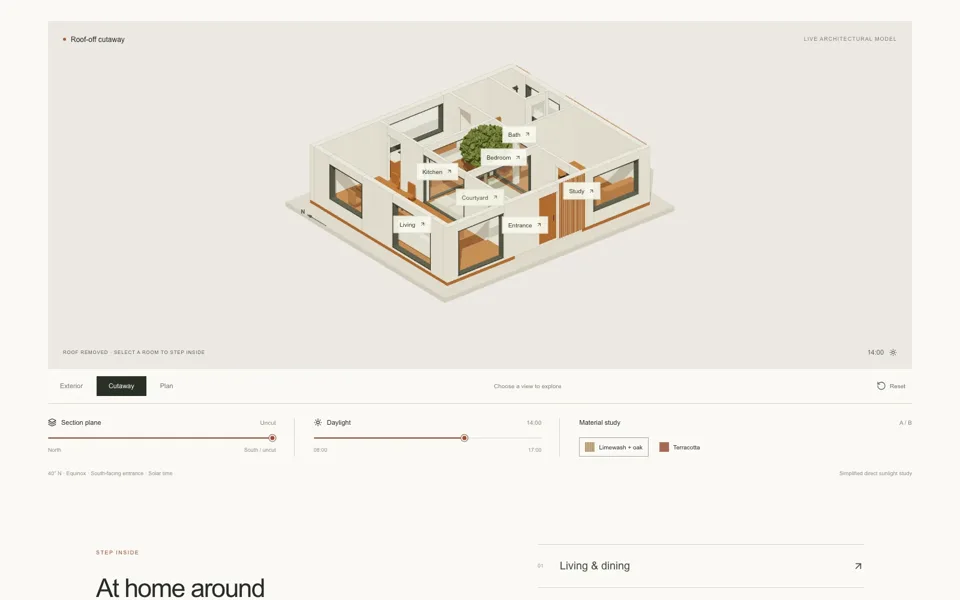
Hero: “A small house built around daylight.” Present one excellent exterior/axonometric image and an “Explore the house” action. Build a single geometrically coherent model and use it throughout the page.

The main interaction is a reversible scroll from exterior to roof-off cutaway to floor plan. A section-plane control then lets the visitor cut across the actual geometry to see room relationships, wall thickness, openings and the courtyard. Named room labels attach to the correct spaces and remain readable; do not put a generic render beside an unrelated invented plan.

Provide a time-of-day slider for one explicitly defined illustrative site orientation and season. Sun direction, shadows through openings and the diagram compass must agree. Use simplified lighting if necessary, but do not invent energy-use or daylight-compliance metrics. Show the time and orientation only where they help explain the view.

Visitors can select one room to see its connected interior view, compare two materially different facade/finish options, and return to the overview without losing their section/time state. Finish with a compact plan/specification summary and a “Download project sheet” action that exports the actual selected plan and views. Areas and dimensions should derive consistently from the model or be omitted.

Use authored 3D geometry with editable model or procedural source and a credible lighting setup. Do not rely entirely on image crossfades. On mobile, offer clear presets for plan/section/exterior rather than forcing difficult free-camera gestures. Verify camera bounds, clipping, labels, room mapping, sun/compass consistency, export and state restoration. The page should communicate a building beautifully and precisely.